❌
 ctosy
(beta)
ctosy
(beta)
Article link element is not just an article url address but a clickable visual element that opens the article it has been created for. Visually it looks like a snippet with the difference that it does not open public modal but the Ectosy article in a new browser tab.
That link element is created by using any snippet you have saved in your snippets table (My Ectosy snippets). Creating a link element from a snippet does not have any effect on the snippet itself, it remains completely unchanged and can be used as snippet. Article link element uses ('clones') only snippet's visual presentation. It is completely valid to create a snippet only in order to use it as an article link element.
Same as snippets, article link elements can be registered on unregistered. Registered article link element is connected to a deal between renter and hoster and both parties can follow its results in Hosting view.
Article link element can be created in 'standalone' way or as an optional step while making offers.
1. Standalone creating article link element:Let's say you want to use your snippet no. 5. in order to create article link element.

Click on the link icon 🔗 and the dialogue will open with two selectable options in order to choose the article and the deal (registration) you want the link element for.
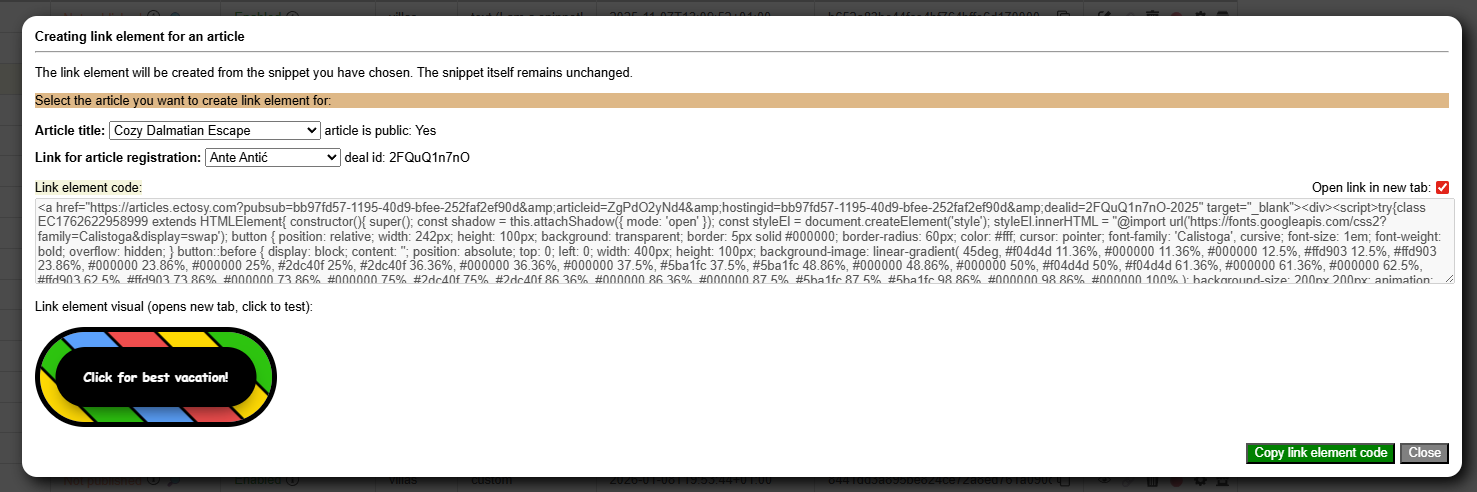
Renter (you) and hoster from that deal will be able to follow its results in the Hosting view.
Below two selectors you will be able to see the element HTML code you can copy (green button: Copy link element code) and its visual representation (test its functionality by clicking on it).
And that's it. Just paste the link element code anywhere you want to use it. Or you can share it so that it can other web pages can include it.
2. Creating article link element within the offer:Renter can create and include article link element directly in the offer when he is:
A. publishing the article on the B2B market
B. placing direct offer to a hoster
In both instances creating a link element is an optional step where renter will be able to select one of his snippets that will be included into offer as the article link element.

Article link element is not just an article url address but a clickable visual element that opens the article it has been created for. Visually it looks like a snippet with the difference that it does not open public modal but the Ectosy article in a new browser tab.
That link element is created by using any snippet you have saved in your snippets table (My Ectosy snippets). Creating a link element from a snippet does not have any effect on the snippet itself, it remains completely unchanged and can be used as snippet. Article link element uses ('clones') only snippet's visual presentation. It is completely valid to create a snippet only in order to use it as an article link element.
Same as snippets, article link elements can be registered on unregistered. Registered article link element is connected to a deal between renter and hoster and both parties can follow its results in Hosting view.
Article link element can be created in 'standalone' way or as an optional step while making offers.
1. Standalone creating article link element:Let's say you want to use your snippet no. 5. in order to create article link element.
Click on the link icon 🔗 and the dialogue will open with two selectable options in order to choose the article and the deal (registration) you want the link element for.
Renter (you) and hoster from that deal will be able to follow its results in the Hosting view.
Below two selectors you will be able to see the element HTML code you can copy (green button: Copy link element code) and its visual representation (test its functionality by clicking on it).
And that's it. Just paste the link element code anywhere you want to use it. Or you can share it so that it can other web pages can include it.
2. Creating article link element within the offer:Renter can create and include article link element directly in the offer when he is:
A. publishing the article on the B2B market
B. placing direct offer to a hoster
In both instances creating a link element is an optional step where renter will be able to select one of his snippets that will be included into offer as the article link element.