❌
 ctosy
(beta)
ctosy
(beta)
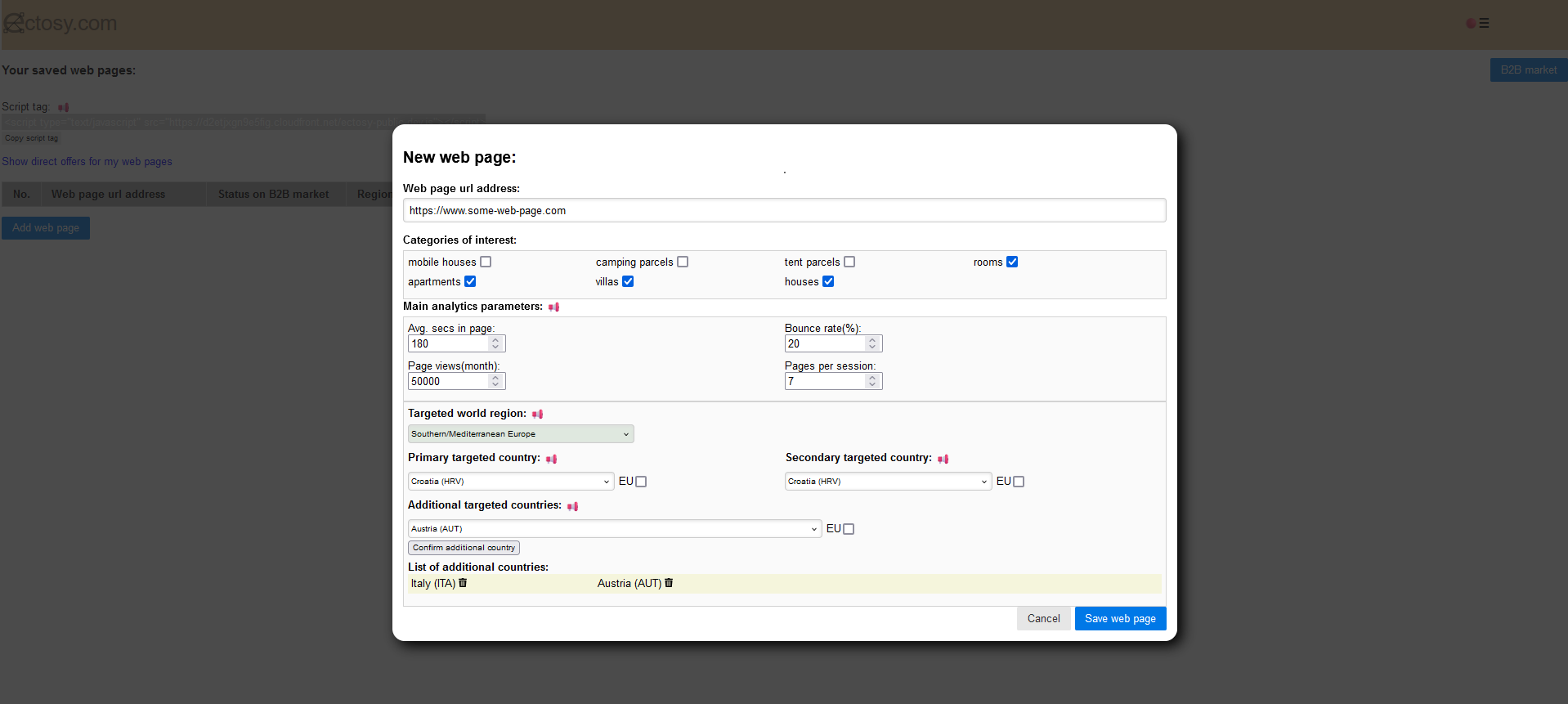
If you are a web page owner/manager and you think it can be used as a platform for tourist promotion, save it in Ectosy app. Click on the My web pages option in the Promotion dashboard, and then on the Add web page button. Enter the web page information.
Saved web page becomes visible in the web pages table.
Most important parameters when saving web page are 'Targeted world region' and 'Primary targeted country' ('targeted' means location where the web site consumers are mainly located). Be sure to select those two values correctly so that, if you publish your web page on B2B market, other users can find it. Parameter 'Secondary targeted country' is also important but not as the first two because it is possible to query web pages on B2B market with parameter 'Secondary targeted country' set to 'all'. All web page parameters are editable (except while published on B2B market).
'Additional targeted country' parameter is optional. Countries that you select here are presented only in informational manner and they do no impact search results.

That entry is enough for you, owner/manager of that web page (or hoster, because you are the one hosting renter's promotional material), to directly offer it to renters. You can search for snippets/articles and propose that web page in your offer.


Note: you can make an offer to the renter even if you did not enter any web page in Ectosy app - in 'Select web page' step you can choose 'Any web page'
However, after entering your web page in Ectosy app you can also publish it on the B2B market with your public terms so that other users know that you are open for business.
If you are a web page owner/manager and you think it can be used as a platform for tourist promotion, save it in Ectosy app. Click on the My web pages option in the Promotion dashboard, and then on the Add web page button. Enter the web page information.
Saved web page becomes visible in the web pages table.
Most important parameters when saving web page are 'Targeted world region' and 'Primary targeted country' ('targeted' means location where the web site consumers are mainly located). Be sure to select those two values correctly so that, if you publish your web page on B2B market, other users can find it. Parameter 'Secondary targeted country' is also important but not as the first two because it is possible to query web pages on B2B market with parameter 'Secondary targeted country' set to 'all'. All web page parameters are editable (except while published on B2B market).
'Additional targeted country' parameter is optional. Countries that you select here are presented only in informational manner and they do no impact search results.
That entry is enough for you, owner/manager of that web page (or hoster, because you are the one hosting renter's promotional material), to directly offer it to renters. You can search for snippets/articles and propose that web page in your offer.
Note: you can make an offer to the renter even if you did not enter any web page in Ectosy app - in 'Select web page' step you can choose 'Any web page'
However, after entering your web page in Ectosy app you can also publish it on the B2B market with your public terms so that other users know that you are open for business.