❌
 ctosy
(beta)
ctosy
(beta)
You can use AI to generate Ectosy content.
All you need to do before that is 1) get your AI API key(s) with Gemini, Claude or OpenAI and 2) save it in the Ectosy dashboard (see Settings/options->AI API Keys). Of course, before using an AI API key read and understand its pricing and terms of use as that is your responsibility.
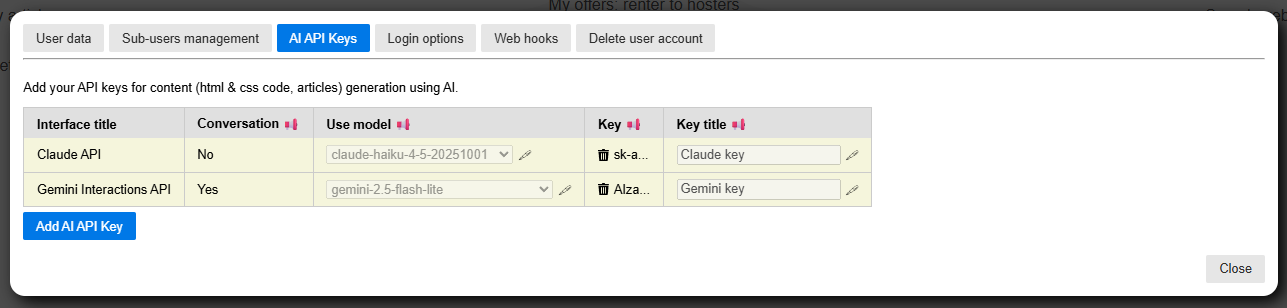
Supported AI API providers urls:
https://aistudio.google.comhttps://platform.claude.comhttps://platform.openai.comContent that you can create with AI:
1. Code for Ectosy custom snippets (see B2B/promotion->Custom AI snippets)
/instructions/custom-ai-snippets/index.html2. Resource positions descriptions and their translations (see Renter dashboard -> Assets AI option)
/instructions/assets/index.html3. Ectosy articles (see B2B/promotion->Creating articles with AI)
/instructions/creating-articles-with-ai/index.htmlYou can use AI to generate Ectosy content.
All you need to do before that is 1) get your AI API key(s) with Gemini, Claude or OpenAI and 2) save it in the Ectosy dashboard (see Settings/options->AI API Keys). Of course, before using an AI API key read and understand its pricing and terms of use as that is your responsibility.
Supported AI API providers urls:
https://aistudio.google.comhttps://platform.claude.comhttps://platform.openai.comContent that you can create with AI:
1. Code for Ectosy custom snippets (see B2B/promotion->Custom AI snippets)
/instructions/custom-ai-snippets/index.html2. Resource positions descriptions and their translations (see Renter dashboard -> Assets AI option)
/instructions/assets/index.html3. Ectosy articles (see B2B/promotion->Creating articles with AI)
/instructions/creating-articles-with-ai/index.html